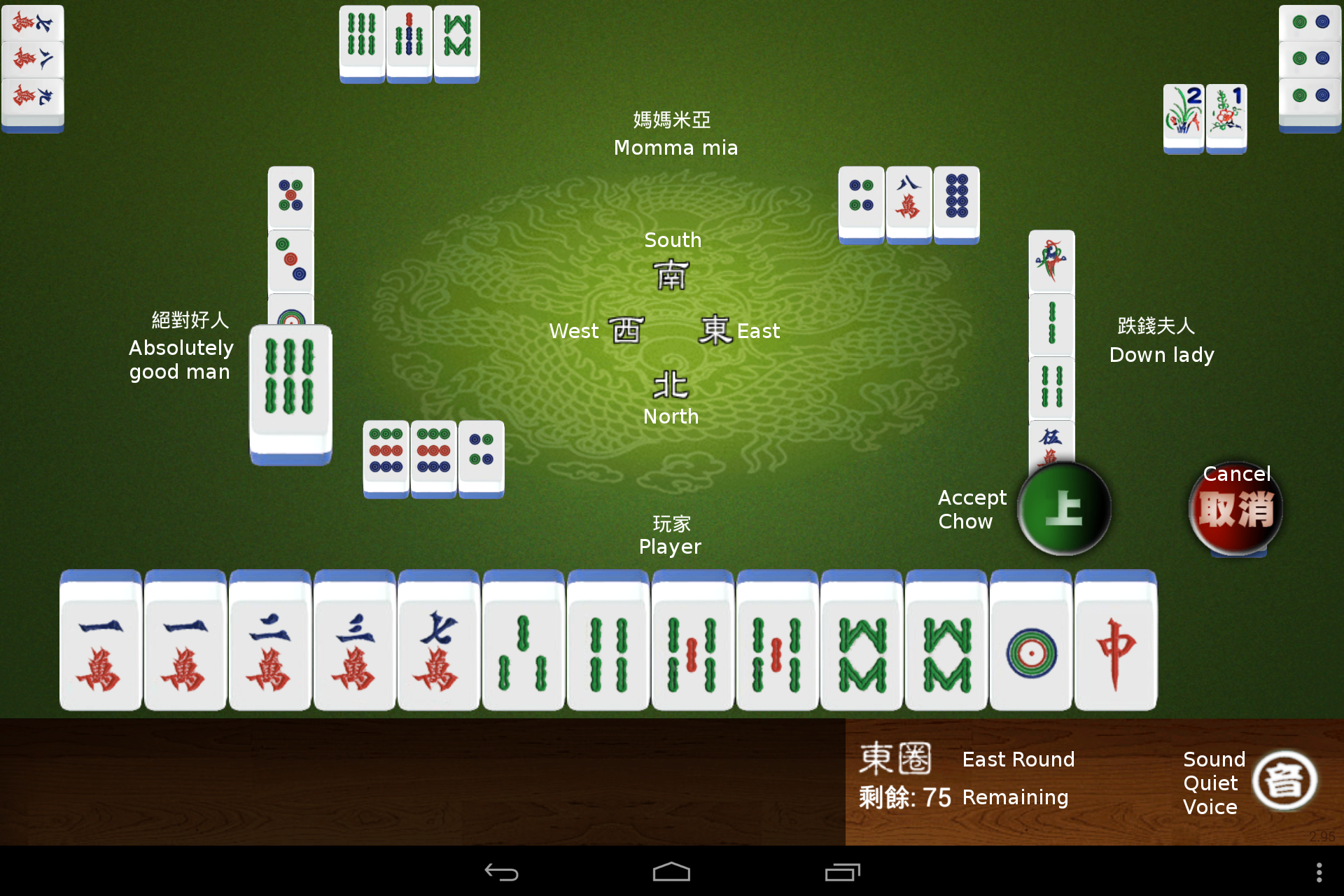
I will describe the play interface on this page and only describe the important differences on subsequent pages.
At the bottom left, in-game banner ads may appear, if you are online.
At the bottom right is the summary information, with the wind of the current round and the number of usable tiles remaining in the wall. There is also a control for the sound settings, which toggle the same three states as the Start Page, Sound & Music, Quiet, Voices Only. Sound & Music is the active setting displayed here.
The player's tiles are across the bottom always. Any flower tiles (if used) are displayed as small tiles above and to the left of the player's tiles.
The melded sets for the other three players are shown at the edges of the screen near their names. Their flower tiles are displayed near their melded sets.
Discarded tiles are arranged in a neat rectangle around the middle of the screen. Early in a hand, it is easy to see who has discarded which tile. When the hand is far along, the discards start overlapping.
In the center of the screen are the winds for the seats. The player is in the north seat for this hand.
On this particular discard, the player to the left has discarded the six of Sticks, which Player can use for a Chow. The discarded tile is shown larger, and the green button will accept the tile for the Chow. The red button will reject the tile. The game will proceed immediately.